
Best Prebuilt Gaming PCs in 2026: Powerful Desktops for Every Type of Gamer

As an Amazon Associate, I earn from qualifying purchases.
Buying a prebuilt gaming PC is a good option if you want to get into PC gaming without spending hours researching individual components, checking compatibility, and putting everything together yourself. You get a complete system that’s ready to use, with Windows installed and the main components already configured.
The challenge is finding one that offers the right balance of performance, cooling, and upgrade potential. A powerful graphics card is important, but you also need a processor that can keep up, enough RAM for modern games, and proper cooling to maintain performance during longer gaming sessions.
I’ve picked out five prebuilt gaming PCs with different hardware configurations. Some are designed for high-end 1440p and 4K gaming, while others offer a more balanced setup for everyday gaming, streaming, and productivity. Whether you want an RTX 5080 system or something more affordable with an RTX 5070, there’s an option worth considering.
Table of Contents
Quick List of Best Prebuilt Gaming PCs
- Alienware Aurora RTX 5080 Gaming Desktop
- Skytech Gaming PC with Ryzen 7 9800X3D
- iBUYPOWER Element Gaming PC
- MSI Codex Z2 Gaming Desktop
- CyberPowerPC Gamer Xtreme RTX 5070
Alienware Aurora RTX 5080 Gaming Desktop

If you’re looking for a high-performance prebuilt gaming PC and don’t want to compromise too much on graphics power, the Alienware Aurora is a strong starting point. It’s equipped with an NVIDIA GeForce RTX 5080 and Intel Core Ultra 9 285 processor, giving it the hardware needed for demanding games, high-resolution gaming, and creative workloads.
The RTX 5080 is the main attraction here. Built on NVIDIA’s Blackwell architecture, it brings advanced ray tracing capabilities and modern graphics features to the system. It’s a good choice if you’re planning to play demanding AAA games at high settings, particularly if you have a 1440p or 4K monitor.
The processor is equally important. The Intel Core Ultra 9 285 gives you plenty of processing power for gaming, streaming, and multitasking. So, if you regularly keep several applications open while gaming or use your PC for video editing and other demanding tasks, this configuration has plenty of headroom.
It comes with 32GB of DDR5 memory and a 1TB SSD. That’s a reasonable starting configuration for a gaming desktop, although you may want additional storage if you have a large library of modern games.
I also like the updated chassis design. The matte basalt black finish gives it a more understated appearance than some gaming desktops, while customizable AlienFX lighting adds some personality. The stadium lighting around the chassis is a particularly distinctive touch.

Cooling is another consideration. Alienware offers an optional 240mm liquid cooling solution with this configuration, designed to help manage temperatures during longer gaming sessions. I’d check the exact configuration before purchasing because the liquid cooling option isn’t necessarily included with every version.
For connectivity, you get Wi-Fi 7, 2.5Gb Ethernet, and Windows 11 Home. Alienware Command Center also lets you adjust lighting, monitor performance modes, and create custom gaming profiles.
The main downside is that Alienware systems can be more expensive than similarly equipped custom-built or independently assembled desktops. You’re also getting 1TB of storage, which might feel limited if you install several large games.
Still, if you want a premium prebuilt system with an RTX 5080, a powerful Intel processor, and a distinctive design, this is my top overall pick.
Skytech Gaming PC Ryzen 7 9800X3D RTX 5070 Ti

If you’re more interested in gaming performance than having the most expensive graphics card possible, this Skytech configuration is worth a closer look. It combines AMD’s Ryzen 7 9800X3D with an NVIDIA GeForce RTX 5070 Ti 16GB, making it an appealing option for anyone who wants a powerful gaming-focused desktop.
The Ryzen 7 9800X3D is the standout component. It’s an 8-core processor with 16 threads, a base clock of 4.7GHz, and boost speeds up to 5.2GHz. Its gaming-focused architecture makes it particularly interesting for people who want high frame rates in CPU-intensive games.
The graphics card is an RTX 5070 Ti with 16GB of GDDR7 memory. This gives you a capable combination for demanding 1440p gaming and high-quality graphics settings. The additional video memory is also useful for games with detailed textures and other demanding graphics workloads.
Another thing I like about this configuration is the 32GB of DDR5 6000MHz RAM. That’s a good amount of memory for modern gaming, streaming, and running other applications in the background. You also get a 2TB Gen4 NVMe SSD, which is a welcome upgrade over the 1TB storage found in several other systems on this list.
Cooling is handled by a 360mm AIO liquid cooler with ARGB fans. That’s a substantial cooling solution for a gaming desktop, and it should help manage processor temperatures during demanding workloads.
The system comes in Skytech’s King 95 case, which has a distinctive appearance with RGB lighting. You also get an 850W Gold-rated ATX 3 power supply, Windows 11 Home, and Wi-Fi connectivity.
One thing worth mentioning is that the listing specifies Wi-Fi 5, rather than the newer Wi-Fi 6 or Wi-Fi 7 standards. The graphics card brand may also vary, and some display and connectivity details can depend on the exact configuration.
Skytech includes a gaming keyboard and mouse, along with a one-year parts and labor warranty and technical support.
Overall, this is a particularly attractive option if your priority is high-FPS gaming. The combination of the Ryzen 7 9800X3D, RTX 5070 Ti, 32GB RAM, and 2TB SSD makes it a well-equipped gaming desktop without stepping up to an RTX 5080 system.
iBUYPOWER Element Gaming PC

Not everyone uses their gaming PC exclusively for gaming. If you also work with multiple applications, edit videos, or handle other demanding tasks, having a powerful processor alongside a capable graphics card can make a noticeable difference. The iBUYPOWER Element is designed around that kind of balanced performance.
It features an AMD Ryzen 9 7900X processor with 12 cores and 24 threads, paired with an NVIDIA GeForce RTX 5070 12GB graphics card. This combination gives you plenty of processing power for multitasking, content creation, and demanding games.
The Ryzen 9 7900X is particularly interesting if you regularly work with applications that can take advantage of multiple cores. Whether you’re editing videos, working with large projects, or streaming while gaming, the additional cores can be useful.
For gaming, the RTX 5070 provides a strong graphics foundation. It’s a good fit for modern games at 1440p, although the exact frame rates will depend on the game, graphics settings, and whether you use features such as ray tracing.
The system includes 32GB of DDR5 RGB memory running at 4800MHz and a 1TB NVMe SSD. That’s enough to get started with a modern gaming setup, though additional storage may be useful if you regularly install large games or keep plenty of media files.
I also like the overall design. It comes in a tempered-glass RGB gaming case with 16-color lighting, giving you a traditional gaming desktop appearance without going overboard. The lighting adds some personality, especially if you keep the PC on your desk.
Connectivity includes six USB 3.1 ports, Gigabit Ethernet, onboard audio, and 802.11AC Wi-Fi. It also comes with a gaming keyboard and RGB mouse, so you have the basic peripherals included.
Another useful addition is that the system is described as AI workstation-ready, which makes it worth considering if you plan to experiment with certain AI-related workloads alongside gaming and productivity.
The main compromise is the 1TB SSD and relatively modest 4800MHz memory speed compared with some of the alternatives here. The supplied specifications also don’t provide much detail about the CPU cooling solution or power supply, so I’d verify those details before purchasing.
MSI Codex Z2 Gaming Desktop

If you want a capable gaming PC without going all the way up to a Ryzen 9 or Core Ultra 9 configuration, the MSI Codex Z2 offers a more balanced setup. It combines an AMD Ryzen 7 8700F processor with an NVIDIA GeForce RTX 5070 graphics card, making it a good option for modern gaming and everyday computing.
The Ryzen 7 8700F is an 8-core, 16-thread processor with boost speeds up to 5.0GHz. It has enough processing power for gaming, streaming, and running background applications without requiring a high-end workstation-class CPU.
The RTX 5070 is the main reason to consider this system. Based on NVIDIA’s Blackwell architecture, it supports modern graphics technologies, including advanced ray tracing. For someone targeting 1440p gaming, it offers a good starting point for playing current games at detailed settings.
You also get 32GB of DDR5 memory and a 2TB SSD. I particularly like the storage configuration because modern games can take up a lot of space. Having 2TB available means you won’t have to start uninstalling games as quickly as you might with a 1TB drive.
Cooling is handled by an ARGB air cooler and four system fans. MSI uses a three-front, one-rear fan arrangement to bring cool air into the case and push warm air out. This should provide a reasonable airflow setup for everyday gaming.
The design is fairly straightforward, but you still get customizable RGB lighting. You can cycle through lighting options using the built-in LED button or make further adjustments through MSI Center.
Connectivity includes USB Type-C, and the system comes with Windows 11 Home. MSI also lists the desktop as VR-ready, making it an option worth considering if you plan to explore virtual reality gaming.
The main advantage here is balance. You get a modern RTX 5070 graphics card, an 8-core AMD processor, 32GB of memory, and 2TB of storage without paying for a more expensive processor that you might not fully use.
CyberPowerPC Gamer Xtreme RTX 5070
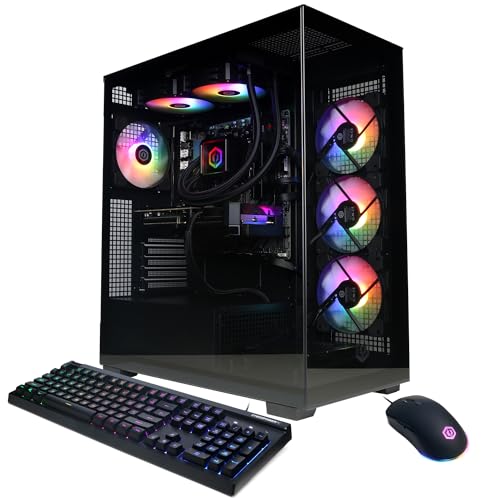
The CyberPowerPC Gamer Xtreme is another interesting option if you want a gaming desktop that can also handle demanding multitasking. It pairs an AMD Ryzen 9 9900X processor with an NVIDIA GeForce RTX 5070 12GB graphics card, giving you a combination of strong processing and graphics performance.
The Ryzen 9 9900X is a 12-core processor with 24 threads and a boost clock of up to 4.4GHz as listed in the supplied specifications. Its additional cores make it useful for workloads that involve video editing, content creation, rendering, and running several applications at once.
For gaming, the RTX 5070 12GB provides the graphics power needed for modern titles. It’s a good option for 1440p gaming, and you can take advantage of NVIDIA’s current graphics features for supported games.
The system comes with 32GB of DDR5 memory and a 1TB PCIe 4.0 NVMe SSD. This is a practical starting configuration, although I’d consider adding more storage if you have a large collection of games.
One feature I like is the liquid-cooled CPU setup. Keeping the processor properly cooled is important when you’re running demanding workloads for extended periods. The tempered-glass side panel and custom RGB lighting also give it a familiar gaming desktop appearance.
Connectivity is fairly generous. You get two USB-C 3.2 ports, four USB-A 3.2 ports, two USB-A 2.0 ports, LAN, Wi-Fi 6, and Bluetooth 5.3. The graphics card has one HDMI port and three DisplayPort outputs, which is useful if you plan to use multiple monitors.
What to Look for When Buying a Prebuilt Gaming PC
Buying a prebuilt gaming PC is easier than assembling one yourself, but you still need to pay attention to the hardware. Two desktops can have similar graphics cards and memory capacities but deliver different experiences depending on their processors, cooling systems, and other components.
Graphics Card (GPU)
The graphics card is usually the most important component for gaming performance. It has the biggest influence on the resolution, graphics settings, and frame rates you can expect.
For most people targeting 1440p gaming, an RTX 5070 or RTX 5070 Ti system is a good place to start. If you’re interested in higher-end 4K gaming or want more graphics headroom, an RTX 5080 configuration is worth considering.
Also pay attention to VRAM. More video memory can help with demanding games, high-resolution textures, and certain creative workloads.
Processor (CPU)
The processor handles game logic, background tasks, and other system operations. You don’t necessarily need the most expensive CPU available, but it should be powerful enough to keep up with your graphics card.
For a gaming-focused setup, a processor like the Ryzen 7 9800X3D is particularly interesting. If you also plan to edit videos, stream, render, or multitask regularly, a Ryzen 9 or Intel Core Ultra 9 processor may make more sense.
RAM and Storage
I’d recommend starting with at least 32GB of RAM if you’re buying a modern gaming PC. It provides enough room for gaming, browsers, voice chat, and other applications without feeling too restrictive.
Storage is equally important. A 1TB SSD is a reasonable starting point, but a 2TB drive gives you more breathing room for large game installations. Look for an NVMe SSD, preferably PCIe 4.0 or newer, for fast loading and file transfers.
Cooling and Airflow
Gaming PCs can generate a lot of heat, particularly when running demanding games for several hours. That’s why cooling should be part of your buying decision.
Some systems use traditional air coolers with multiple case fans, while others include AIO liquid cooling. Neither is automatically better for every build; what matters is whether the cooling system can manage the CPU’s temperatures without excessive noise or thermal throttling.
Also look at the case design. A system with good airflow can help maintain more consistent performance during longer gaming sessions.
Power Supply
Don’t overlook the power supply. It needs to provide enough power for the CPU and graphics card while leaving some room for future upgrades.
Check the wattage, efficiency rating, and power supply standard. A quality unit is especially important in systems with higher-end graphics cards.
Upgrade Potential
A prebuilt gaming PC should ideally give you some room to upgrade later. Check whether the motherboard supports additional RAM, whether there are free storage slots, and whether the power supply can accommodate a future graphics card upgrade.
It’s also worth checking the case dimensions and cooling clearance. Some proprietary desktop designs can make future upgrades more complicated than standard components.
Final Thoughts
The best prebuilt gaming PC depends on the kind of games you play, the resolution you want, and whether you’ll use the desktop for anything beyond gaming. If you’re targeting high-end 1440p or 4K gaming, a system with a more powerful graphics card is worth considering. For most gamers, though, a well-balanced setup with a capable processor, 32GB of RAM, and a modern graphics card should be more than enough.
I’d pay particular attention to the graphics card, cooling, and power supply rather than choosing a PC based on processor specifications alone. Storage is another thing worth considering, especially if you regularly play several large games.
You don’t necessarily need the most expensive desktop to get a great gaming experience. The right prebuilt PC is one that delivers the performance you need today while leaving enough room to upgrade as your gaming requirements change.